Designing for Presence

Part 1: Virtual Field Trip
A. 360 Video: Walking New York by The New York Times
Presence Checklist | Rating (out of 5) |
I felt as if I was actually in that place. | 3 |
I forgot that I was looking through a screen. | 3 |
I wanted to look around and explore. | 2 |
Sound made the place feel more real. | 1 |
Did anything break the presence? | Transitions between scenes |
Honestly, the whole thing felt staged. The music playing over the whole thing kind of broke the immersion.
B. Google Streetview: Georgia Avenue
Presence Checklist | Rating (out of 5) |
I felt as if I was actually in that place. | 4 |
I forgot that I was looking through a screen. | 4 |
I wanted to look around and explore. | 5 |
Sound made the place feel more real. | 1 |
Did anything break the presence? | Nothing was moving around |
I walk down this road almost every day, so it was easy to get immersed and go to places I don’t usually visit. Also, I usually wear headphones when I’m walking, so sound doesn’t matter too much for me.
C. Regular Flat Video: I-495 Inner Loop Capital Beltway Drive
Presence Checklist | Rating (out of 5) |
I felt as if I was actually in that place. | 2 |
I forgot that I was looking through a screen. | 3 |
I wanted to look around and explore. | 3 |
Sound made the place feel more real. | 4 |
Did anything break the presence? | Only going in one direction, can’t see windows of car |
This is the route my family often takes to get home from my grandparents’ house on weekends. The only thing breaking the immersion is that you can’t see the inside of the car.
Part 2: Immersive Redesign Storyboard
This VR experience recreates a series of games from the Nintendo Wii, but with a 1st-person view.
Frame Number | 1 | 2 | 3 | 4 | 5 | 6 |
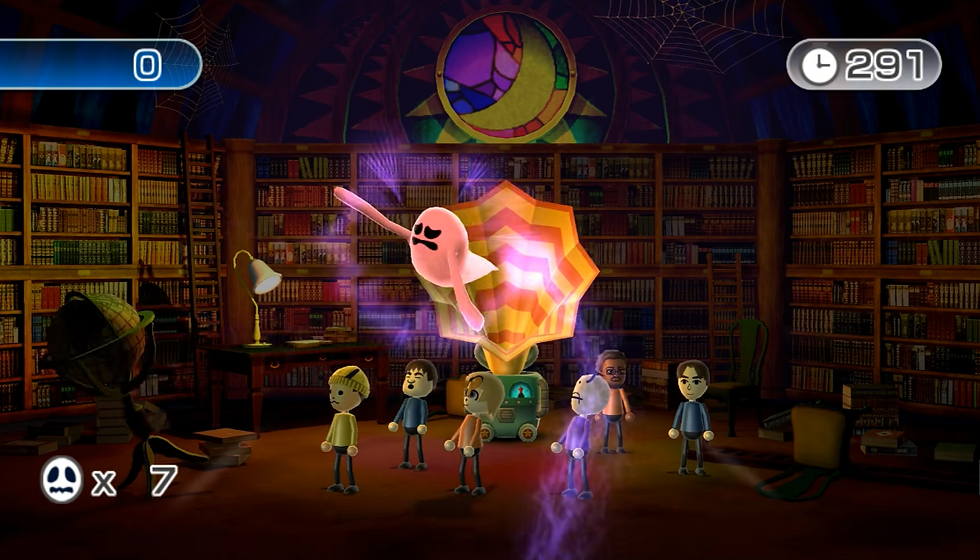
Where is the viewer? | Clearing in a grassy field | Town plaza near a fountain | Inside a Boxing Gym | At a ping pong table | At an archery range | In a haunted mansion |
What can they see? | Tall grass, trees in distance, blue, sky bullseye targets that appear out of thin air | Blue sky, fountain spouting water, tables and chairs, large objects marked with large red directional arrows | Punching bags in the background, racks of equipment, trainer holding boxing pads | Ping pong table, opponent on other side of table, group of people behind barriers, their own paddle | A bow in their hands, a far-away bullseye target, blue sky, trees in front of a rock face | A dark room with bookcase lining the walls, a ghost trap, a group of 6 humans in front of you, wispy ghosts |
Where can they look? | They can look in 360 degrees. Arrows on the screen point in the direction of targets. | They can look in 360 degrees, but would be reminded to keep looking forward by warnings at the edge of the screen | They can look in 360 degrees, but would be reminded to keep looking forward by warnings at the edge of the screen | They can look in 360 degrees, but would be reminded to keep looking forward by warnings at the edge of the screen | They can look in 360 degrees, but would be reminded to keep looking forward by warnings at the edge of the screen | They can look in 360 degrees. The 6 humans will provide hints to the ghosts’ locations, which appear on the sides of the screen. |
What can they do? | Move the controllers to aim and press the buttons to shoot at the targets | Swing your controllers in the direction the red arrow is pointing to cut the objects that appear to score points | Move your arms and punch the pads as they come up, either the left or right one, to score points. Hitting the wrong side costs points. | Pick up the paddle with the controller in your dominant hand, then move it from side to side to hit the ball. The first to score 4 points wins. | Use your hands to draw back the bowstring and fire the arrow, with the aid of an aiming cursor. Hold down the button to pull back, release to shoot. | Look around the room using the clues to find the hidden ghosts. Then, using the capture device, drag the ghosts back into the trap. |
What can they hear? | Wind blowing, grass rustling, lasers firing, targets shattering | Rushing water, people clapping, sword swishing, objects getting sliced | AC in the background, metallic sounds of training equipment, impacts of punches | Ping-pong ball bouncing, crowd cheering, referee whistle | Arrow flying through air, bowstring strain and twang, forest animals in surroundings | Ghosts moaning, thunder rumbling, humans speaking gibberish, electric zapping from ghost trap |
Visuals (not mine, taken from Wii Sports, Wii Sports Resort, Wii Play, and Wii Play Motion)
Frame 1:

Frame 2:

Frame 3:

Frame 4:

Frame 5:

Frame 6:
Part 3: Storyboard Walkthrough Video
Part 4: Reflection
For me, the field trip experience that created the strongest presence was the second one, Google Streetview of Georgia Avenue. The fact that I had full control over where I wanted the camera to go, and that I routinely walk down this road IRL were the factors that helped. It was very different from the 360 videos since there, the objects around the viewer are constantly moving, and there is sound involved, whereas on Streetview, there is no sound and everything is frozen in place. I think the hardest part of designing my own 360 experience was picking out games that would actually work in 1st person, and still act the same as their 3rd person basis.
Comments